iOS Builds from Cloud Agents: Claude Code on the Web, Codex Cloud and Cursor (2026)
Claude Code on the web, Codex cloud and Cursor’s cloud agents run your task on Linux machines the vendor hosts, so none of them can run Xcode, build an iOS app for the simulator, or run XCUITests on their own. To get iOS builds from them, the agent has to send the work to a Mac somewhere: a Mac you own and expose over SSH, a CI service, or a cloud Mac it can call from a command line. In each case you set three things in the agent’s environment: an API key, an install line, and network access to the Mac’s host, which two of the three block by default.
I checked each vendor’s docs on October 24, 2026, and ran the same setup they’d run, from a Linux machine with an empty home folder and only an API key in the environment. Disclosure: I make macbox, the cloud Mac I use in the examples. The network steps apply to any remote Mac you call over HTTPS.
Why cloud agents can’t build iOS apps
Each vendor’s hosted environment is a Linux VM or container (Claude and Cursor also let you bring your own machine, which this guide doesn’t cover):
| Agent | What your task runs on | Xcode? |
|---|---|---|
| Claude Code on the web | “a fresh virtual machine (VM) running Ubuntu 24.04 on x86_64” (docs) | No |
| Codex cloud | The universal image, built FROM ubuntu:24.04, linux/amd64 only (codex-universal) |
No. It has a Swift toolchain, but that’s Swift for Linux |
| Cursor cloud agents | “isolated Ubuntu machines” (docs) | No |
Xcode and the iOS Simulator only run on macOS, so a Linux box can’t fix this with a package install. Anthropic says as much about its own simulator feature: it’s “available in local sessions only. In cloud and SSH sessions, Claude runs on a machine that can’t reach the simulators on your Mac” (docs). Cursor’s Xcode integration needs Xcode 26.3 or later on a Mac (docs).
Codex’s Swift toolchain helps a little: on Linux it can compile and test Swift packages that don’t import UIKit or SwiftUI. Anything that touches Apple’s frameworks, or needs a simulator, still needs a Mac.
People have been asking for a while. A thread on Cursor’s forum from April, “Cursor cloud environments for iOS/Swift apps, worth it?”, asked whether anyone was getting value from remote environments for native iOS and whether Cursor planned stronger mobile workflows in cloud agents. It closed with no replies (thread).
Your options
- A Mac you own, over SSH. Free if you have one. Expose it to the internet, put an SSH key in the agent’s secrets, and have the agent run
xcodebuildover SSH. You’ll also be the one syncing code and keeping the Mac awake and updated. - CI (Xcode Cloud, GitHub Actions macOS runners, Codemagic). Good for building on every push and shipping to TestFlight. Bad for an agent mid-task: it has to push, wait for a runner, and read a log back.
- A cloud Mac with a CLI or MCP server. The agent runs one command and gets the result back in the same turn. That’s what macbox does, and NoMac offers a similar service. The rest of this guide uses macbox, but the network steps are the same idea for any of them.
What the agent needs from its environment
Whatever Mac you use, the cloud agent’s environment needs three things:
- A credential as an environment variable. A cloud session forgets logins when it ends, so
macbox logindoesn’t stick. Get an API key athttps://api.macbox.build/signup?key=1and store it asMACBOX_API_KEY. When it’s set, the CLI uses it instead of any saved login. - An install line in the setup script, so every new session has the CLI:
Or skip the install and have the agent callcommand -v macbox || curl -fsSL https://api.macbox.build/install.sh | sh export PATH="$HOME/.local/bin:$PATH"npx -y macboxeach time. - Network access to the Mac. The macbox CLI talks to
api.macbox.build, then straight to your Mac atmini-N.macbox.build(macbox statusshows which).npxalso needsregistry.npmjs.org. This is the step that breaks: Claude Code on the web and Codex cloud both block it by default.
Claude Code on the web
- Open the environment selector under the message box at claude.ai/code, hover your environment, and open its settings.
- Environment variables: add
MACBOX_API_KEY=<your key>(oneKEY=valueper line). Anthropic notes that “anyone who uses the environment can read the values”, so use a key you’re happy to share with everyone on that environment. - Setup script: paste the install line above. It has to exit 0.
- Network access: the default level, Trusted, “allows package registries and other allowlisted domains”.
registry.npmjs.orgis on that list, sonpx -y macboxinstalls fine, butmacbox.buildisn’t, so the first build fails. Switch to Custom, add these under Allowed domains, and tick Also include default list of common package managers:
A leadingapi.macbox.build *.macbox.build*.matches every subdomain, so this covers whichever Mac you’re on. Choosing Full also works. Save; running sessions pick up the change within about a minute.
Then, in a session: “Run macbox status, then build and test the app with macbox.”
One difference worth knowing: MCP connectors you enable in Claude “work without adding their hosts to Allowed domains, because connector traffic travels through Anthropic’s servers” (docs). macbox runs as a CLI or a local MCP server, not a connector, so on Claude Code on the web you need the allowlist.
Codex cloud
OpenAI has two versions of these settings: current Codex Cloud environments and the older “Legacy” ones. The steps below work in both; where they differ, I say so.
- Open your environment in Codex’s settings (chatgpt.com/codex/settings/environments).
- Add
MACBOX_API_KEYas an environment variable, which programs can read while the task runs. In Legacy environments, don’t use a secret instead: there, secrets are “only available to setup scripts” (docs). - Install the CLI in the environment’s install script (called the setup script in Legacy). Then have the agent call it by its full path,
~/.local/bin/macbox, so it doesn’t depend onPATHcarrying over from the script. Or skip the install and have the agent runnpx -y macbox. - Internet access: turn on internet access for the environment (current docs); in Legacy, “Codex blocks internet access during the agent phase” by default (docs). If you limit domains, add
api.macbox.buildand the Mac thatmacbox statusnames, for examplemini-2.macbox.build, plusregistry.npmjs.orgif you usenpx. Legacy lists subdomains one by one (“Other subdomains require their own allowed-domain entries”), so*.macbox.buildisn’t enough there.
Cursor cloud agents
- On cursor.com/dashboard/cloud-agents, add
MACBOX_API_KEYunder Secrets. Cursor exposes secrets “to the cloud agent as environment variables”. - Add the install line to the
installstep of.cursor/environment.json. Cursor runsinstallwhen it builds the environment, before agents start on it. If you use a saved environment, check that it points at this file. Thecommand -v macbox ||part makes the line safe to run again. - Network: “The agent has internet access by default” (docs), so there’s nothing to change. If your team uses Default + allowlist or Allowlist only, add
api.macbox.buildand your Mac’s host, plusregistry.npmjs.orgif you usenpx.
What a run looks like
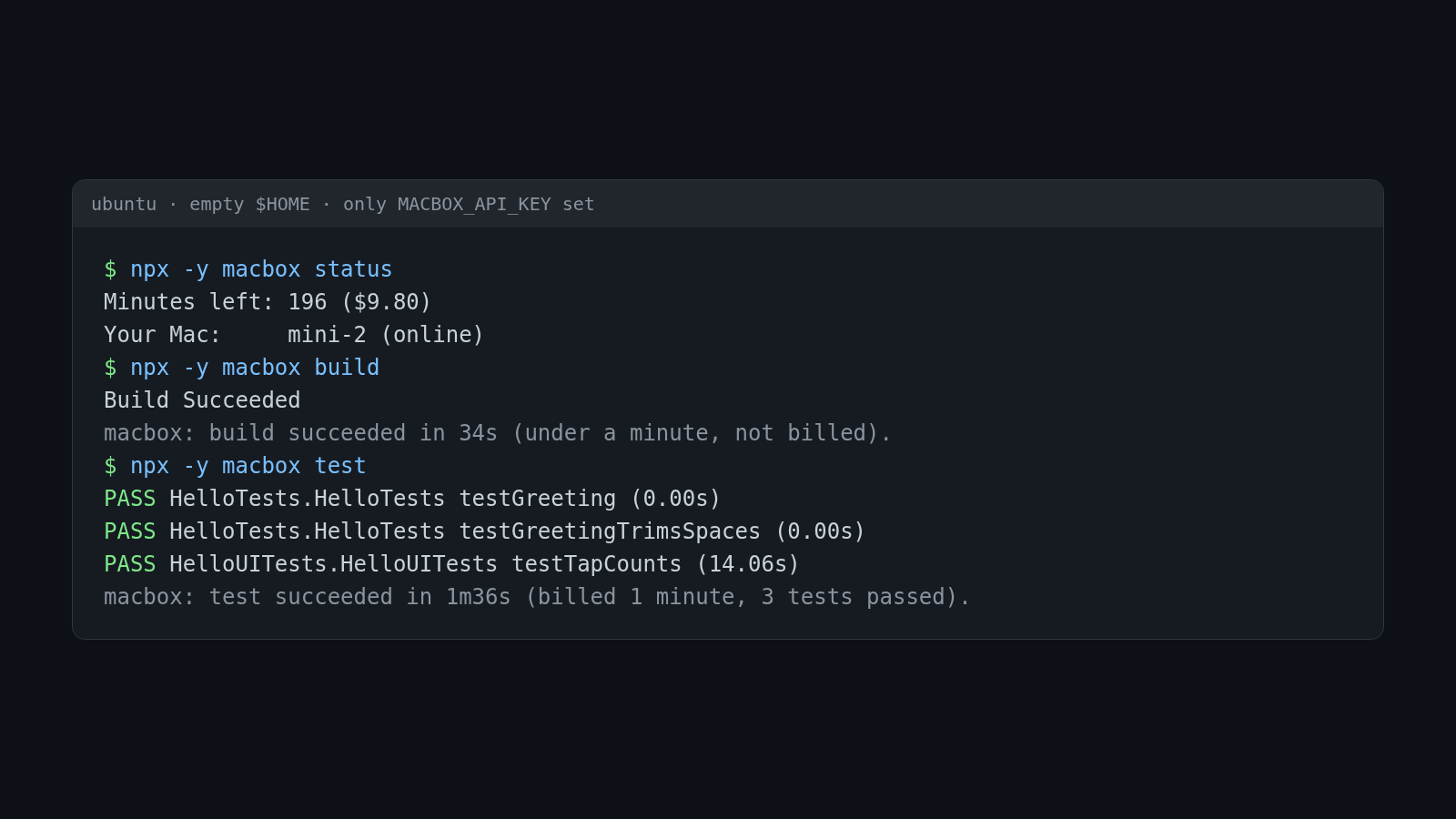
This is the run I did to check the setup: an Ubuntu machine, a new empty home folder, no saved login, and only MACBOX_API_KEY in the environment, as in a cloud sandbox. The project is a small SwiftUI sample app with two unit tests and one UI test.
$ npx -y macbox status
Minutes left: 196 ($9.80)
Used today:   0 of 180 minutes
Your Mac:     mini-2 (online)

$ npx -y macbox build
...
Build Succeeded
macbox: build succeeded in 34s (under a minute, not billed). Job 25a9c7f5b3ebec14.

$ npx -y macbox test
macbox: Using scheme "Hello" (others: Greeting). Pass --scheme to choose.
macbox: Testing Hello
PASS HelloTests.HelloTests testGreeting (0.00s)
PASS HelloTests.HelloTests testGreetingTrimsSpaces (0.00s)
PASS HelloUITests.HelloUITests testTapCounts (14.06s)
macbox: test succeeded in 1m36s (billed 1 minute, 3 tests passed). Job aa59c90237e4c9cd.
The build took 34 seconds and cost nothing, because macbox bills whole minutes and the leftover part of a minute is free. The tests took 1 minute 36 seconds and were billed 1 minute, $0.05. The agent gets one PASS or FAIL line per test, so it doesn’t have to read pages of xcodebuild output.
A limit on what I tested: I ran this from my own Linux machine with the same environment a sandbox would have. I didn’t run it inside each vendor’s sandbox, so the network steps above come from their docs, not from a session I watched fail and then pass. If one of them behaves differently, tell me and I’ll fix the guide.
What still doesn’t work from a cloud agent
- Signing, TestFlight and physical devices. macbox builds for the simulator only. For TestFlight from a cloud agent, use a CI service (Xcode Cloud, or fastlane on a macOS runner) and have the agent push.
- React Native, Flutter and Expo aren’t supported on macbox yet.
- Watching the simulator.
macbox runprints a live link you can open in your browser and click around in, and the agent can read the screen and tap withmacbox ui describeandmacbox ui tap. Claude’s built-in simulator pane won’t show it, because that pane only works in local sessions on a Mac.
FAQ
Can Claude Code on the web build iOS apps?
Not by itself. Anthropic’s hosted environment runs Ubuntu, and Xcode only runs on macOS. It can write Swift and send the build to a remote Mac, as long as you allow that Mac’s host in the environment’s network settings. The default Trusted level blocks it.
Does Codex cloud support Xcode?
No. Codex cloud’s universal image is Ubuntu 24.04 with a Linux Swift toolchain, which can build and test Swift packages that don’t import Apple’s frameworks. For an iOS app or the simulator, Codex has to call a Mac, with internet access turned on for the agent phase.
Can Cursor background agents run the iOS Simulator?
Not on Cursor’s hosted machines, which run Ubuntu. They can drive a simulator on a remote Mac. Cursor’s cloud agents have internet access by default, so a cloud Mac CLI works without network changes.
Where should the API key go?
As an environment variable the agent can read while it works: Claude Code on the web’s Environment variables, a Codex environment variable, or a Cursor cloud agent secret. Never paste it into the chat or commit it.
How much does it cost?
macbox is $0.05 per Mac minute, whole minutes only, and you pay only while a build, test, screenshot or live session runs. The build-and-test loop above cost $0.05. New accounts get $10 of credit. The cloud agent itself is billed separately by Anthropic, OpenAI or Cursor.
Is there a guide for running Claude Code locally on Linux?
Yes: Claude Code for iOS, even without a Mac covers the local loop. If you want Sentry’s Xcode MCP server on a remote Mac, see MobileBuildMCP on a remote Mac.