XcodeBuildMCP (Now MobileBuildMCP): Setup, and Running It Without a Mac
XcodeBuildMCP is an open-source Xcode MCP server that lets a coding agent like Claude Code, Codex or Cursor build your iOS app, run it in the Simulator, run its tests, read the screen and tap through it. In September 2026 it was renamed MobileBuildMCP, so if you install the old package name today you get a frozen version. It also only runs on a Mac, which is a problem if your agent lives on Linux, in WSL, or in a cloud sandbox.
This guide covers both: how to set up the current version on a Mac, and how to use it when your agent isn’t on one. The second part comes from a real run I did on October 22, 2026, from an Ubuntu machine: 67 tools listed in 2 seconds, an app built and launched in 65 seconds, three tests passing, and a scripted MCP client reading the screen and tapping a button, using the same tool calls Claude Code or Codex would make. The balance on the account dropped by $0.10.
Disclosure: I make macbox, the cloud Mac used in that run. If your agent already runs on a Mac, you don’t need it.
The short version
- The package is now
mobilebuildmcp. The oldxcodebuildmcpnpm package stopped at 2.7.0. - On a Mac, with Claude Code:
claude mcp add MobileBuildMCP -- npx -y mobilebuildmcp@latest mcp - It needs macOS 14.5 or later, Xcode 16 or later, and Node.js 18 or later.
- It doesn’t run on Linux or Windows. To use it from there, run it on a remote Mac.
XcodeBuildMCP is now MobileBuildMCP
Cameron Cooke created XcodeBuildMCP in March 2025. Sentry acquired it in February 2026, and Cooke joined Sentry (Sentry’s announcement). Version 2.7.1, released September 23, 2026, renamed nearly everything (release notes):
| What | Before | Now |
|---|---|---|
| npm package and CLI | xcodebuildmcp |
mobilebuildmcp (and mobilebuildmcp-doctor) |
| Environment variables | XCODEBUILDMCP_* |
MOBILEBUILDMCP_* |
| Project config | .xcodebuildmcp/ |
.mobilebuildmcp/config.yaml |
| State directory | ~/Library/Developer/MobileBuildMCP |
|
| MCP registry name | io.github.getsentry/mobilebuildmcp |
|
| Homebrew tap | getsentry/xcodebuildmcp |
same tap, formula mobilebuildmcp |
| Website | xcodebuildmcp.com (retired) | mobilebuildmcp.com |
The repo is getsentry/MobileBuildMCP, and the old GitHub URLs redirect to it. It’s MIT-licensed and had 6,497 stars when I checked.
The old npm package xcodebuildmcp stopped at 2.7.0 and isn’t marked deprecated. Several of the pages that rank for “xcodebuildmcp” still use the old package name, and npx xcodebuildmcp@latest quietly gives you 2.7.0. If you set this up from an older guide, check which package your MCP config calls.
What it can do
The project defines 82 tools across 15 workflows (tool manifests). The ones you’ll use most:
| Workflow | Example tools |
|---|---|
| Simulator | build_run_sim, test_sim, screenshot, snapshot_ui, record_sim_video |
| UI automation | tap, swipe, type_text, wait_for_ui |
| Debugging (LLDB) | debug_attach_sim, debug_breakpoint_add, debug_stack, debug_variables |
| Swift packages | swift_package_build, swift_package_test, swift_package_run |
| Simulator settings | set_sim_location, set_sim_appearance, erase_sims |
| Device | build_run_device, test_device (physical devices) |
| Xcode IDE | xcode_ide_list_tools, xcode_ide_call_tool (bridges to Apple’s own Xcode MCP) |
Only the simulator workflow is on by default. If your agent can’t see the debugging or device tools, that’s why: turn on the other workflows with the enabledWorkflows setting described in the project’s docs.
Since version 2.6, the same package is also a command-line tool, for example mobilebuildmcp simulator build --scheme MyApp --project-path …, so you can call the same tools from a shell script.
Install it on a Mac
Requirements, from the README: macOS 14.5 or later, Xcode 16.x or later, and Node.js 18 or later (not needed if you install with Homebrew).
Pick one:
# Homebrew (the tap keeps its old name)
brew tap getsentry/xcodebuildmcp && brew install mobilebuildmcp

# npm, installed globally
npm install -g mobilebuildmcp@latest

# or nothing installed: your MCP config runs it on demand
npx -y mobilebuildmcp@latest mcp
mobilebuildmcp init installs its agent skills, which teach the agent how to use the tools.
Connect Claude Code, Codex or Cursor
These come from the project’s client setup docs.
Claude Code:
claude mcp add MobileBuildMCP -- npx -y mobilebuildmcp@latest mcpCodex CLI:
codex mcp add MobileBuildMCP -- npx -y mobilebuildmcp@latest mcpBuilds can take longer than Codex’s default tool timeout, so the docs recommend raising it in ~/.codex/config.toml:
[mcp_servers.MobileBuildMCP]
command = "npx"
args = ["-y", "mobilebuildmcp@latest", "mcp"]
tool_timeout_sec = 600
Without it you can hit “timed out awaiting tools/call after 60s” in the middle of a build.
Cursor: add the same npx command to .cursor/mcp.json. If you put it in your global config instead, add "env": {"MOBILEBUILDMCP_CWD": "${workspaceFolder}"} so it finds the right project.
To check it worked, ask your agent to list the MobileBuildMCP tools, then to find your project and build it.
Why it won’t run on Linux or Windows
An xcodebuild MCP like this one drives Apple’s command-line tools: xcodebuild to build, simctl for the Simulator, LLDB for debugging. Those ship with Xcode, and Xcode only runs on macOS, which is why the README asks for macOS 14.5 and Xcode 16. The server also only speaks stdio, so it runs as a local process next to your agent; there’s no hosted or HTTP mode to point it at.
That rules out more setups than people expect. Claude Code on the web, when Anthropic hosts the session, runs on “a fresh virtual machine (VM) running Ubuntu 24.04 on x86_64, regardless of your own operating system” (Anthropic’s docs). WSL on Windows is Linux too; if that’s you, Xcode on Windows covers the wider options. In all of these, the agent can write Swift but can’t start MobileBuildMCP.
Running XcodeBuildMCP from Linux, WSL or the cloud
The fix is to run MobileBuildMCP on a Mac and let your agent reach it. Two ways:
Option A: your own Mac over SSH
If you have a Mac you can SSH into, MCP clients can start a server over SSH, because stdio passes through. You’d point the MCP command at ssh your-mac npx -y mobilebuildmcp@latest mcp. In Claude Code that would be claude mcp add MobileBuildMCP -- ssh your-mac npx -y mobilebuildmcp@latest mcp. I haven’t tested this setup myself, so treat it as a starting point. If npx isn’t found, use its full path (for example /opt/homebrew/bin/npx), since SSH commands don’t load your login shell. The code is the harder part: MobileBuildMCP builds whatever is on the Mac’s disk, so you also need your project on the Mac and kept in sync with every edit your agent makes.
Option B: macbox
macbox runs MobileBuildMCP on a cloud Mac for you and handles the syncing. Install the CLI and sign in first:
curl -fsSL https://api.macbox.build/install.sh | sh
macbox login
macbox login prints a link; sign in with GitHub, then run it again to finish. Or tell your agent “Set up macbox by following https://api.macbox.build/guide/” and it does both. New accounts start with $10 of credit. In a cloud agent (Claude Code on the web, Codex cloud), a login doesn’t last past the session: get a key at https://api.macbox.build/signup?key=1, add it as the MACBOX_API_KEY secret in the agent’s environment settings, and add the install line to the environment’s setup script.
Then one line per agent:
claude mcp add macbox-xcode -- macbox mcp --xcode
codex mcp add macbox-xcode -- macbox mcp --xcode
Your agent uses the paths in your repo as usual. macbox maps them to the Mac’s copy, syncs your edits before every tool call, and keeps the session (and a debugger attached to the app) running between calls. The Mac starts on the first tool call, not when your agent starts. Telemetry to Sentry is turned off, and the tools for physical devices, the Xcode app and creating new projects are left out, which is why my run listed 67 tools rather than the full set.
Here’s that run, from an Ubuntu machine with no Mac. I drove it with a small scripted MCP client rather than Claude Code, so the table shows exactly the tool calls an agent would send, on a small SwiftUI sample app with an XcodeGen project.yml, two unit tests and one UI test:
| Step | MCP tool | Time | What came back |
|---|---|---|---|
| Connect, list tools | tools/list |
2.0 s | 67 tools; no Mac started yet |
| Find the project | discover_projs |
23.5 s | Hello.xcodeproj (the macbox log showed “Generating the Xcode project with XcodeGen” first) |
| List simulators | list_sims |
0.2 s | iOS 27.0: iPhone 18 Pro, iPhone 17, iPhone Air, iPads |
| Set defaults | session_set_defaults |
9.1 s | project, scheme, simulator saved |
| Build, install, launch | build_run_sim |
65.2 s | “Build succeeded. (56.7s)” |
| Screenshot | screenshot |
49.7 s | the first screenshot was slow; I don’t know why yet |
| Read the screen | snapshot_ui |
1.2 s | e9|tap|button|Tapped 0 times |
| Run the tests | test_sim |
25.5 s | “3 tests passed, 0 failed, 0 skipped” |
| New session: set defaults, relaunch, read | session_set_defaults, launch_app_sim, snapshot_ui |
2.2 s, 2.5 s, 0.5 s | app relaunched, button still “Tapped 0 times” |
| Tap the button | tap (e9) |
1.9 s | “Tap on elementRef e9 simulated successfully” |
| Read it again | snapshot_ui |
0.8 s | button now says “Tapped 1 times” |
| Screenshot again | screenshot |
1.0 s | the image below |
The rows come from three of the five MCP sessions I ran: the first found the project, the second built, tested and read the screen, and the last tapped. The two in between failed: one because a new session needs its defaults set again, the other because the app wasn’t running yet.
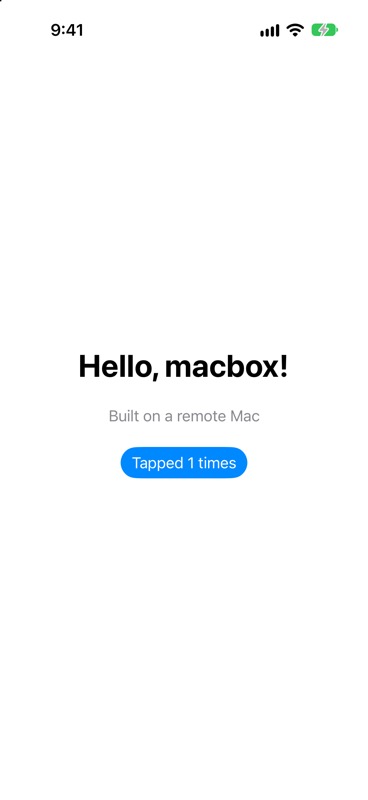
Across all the sessions in this run, the account balance dropped by $0.10. macbox bills $0.05 per Mac minute in whole minutes, only while a build, tests, a screenshot or a live session runs, so a job under a minute is free. For the same loop with macbox’s own commands instead of MCP, see the Claude Code iOS guide.
What tripped me up:
- Session defaults don’t carry over. MobileBuildMCP’s project, scheme and simulator defaults last for one MCP session. When I started a new one, all four calls I made failed with “Missing required session defaults: simulatorId is required” until I called
session_set_defaultsagain. - Element refs are per snapshot.
taptakes a ref likee9from the latestsnapshot_ui. Read the screen right before you tap. - Stop the Mac when you’re done. When my test client exited, the Mac session kept running, and my next session waited behind it.
macbox stopends it.
XcodeBuildMCP vs Apple’s Xcode MCP
Xcode 26.3 added its own MCP bridge alongside the built-in Claude Agent and Codex, so other agents can connect with xcrun mcpbridge. In Claude Code that’s claude mcp add --transport stdio xcode -- xcrun mcpbridge (Daniel Saidi’s walkthrough). Apple’s AI coding features need macOS 26, and users report an “Allow ‘agent’ to access Xcode?” prompt for each new agent process (InfoQ).
Apple’s bridge connects your agent to Xcode itself, with Apple’s approval prompt, while MobileBuildMCP drives Apple’s command-line tools directly. You don’t have to choose, either. MobileBuildMCP’s xcode-ide workflow can call Apple’s bridge from inside MobileBuildMCP. Both need a Mac.
Telemetry
MobileBuildMCP sends Sentry error events about its own runtime failures, with home-directory paths redacted. According to its privacy docs, it never sends tool inputs or outputs, build or test failures, environment variables, source code, build artifacts or certificates.
To turn it off, set MOBILEBUILDMCP_SENTRY_DISABLED=true in your MCP client’s environment, or sentryDisabled: true in the project config. Note the new prefix: the old XCODEBUILDMCP_SENTRY_DISABLED is from before the rename.
Alternatives
- ios-simulator-mcp: a smaller iOS simulator MCP server focused on interacting with the Simulator. MIT, about 2,200 stars, runs on your Mac.
- Argent from Software Mansion: an MCP server and skills for simulator control, logs and profiling. Argent Cloud hosts simulators from $299 a month for up to six in parallel.
- NoMac: a hosted cloud Mac for agents over MCP, CLI, API or SSH, $0.80 an hour billed by the minute.
- Apple’s
xcrun mcpbridge: covered above.
FAQ
Is XcodeBuildMCP the same as MobileBuildMCP?
Yes. It was renamed in version 2.7.1 in September 2026. Same project, same repo (the old URLs redirect), new package name and environment variable prefix.
Is XcodeBuildMCP made by Sentry?
Cameron Cooke created it; Sentry acquired it in February 2026, and he joined Sentry. It’s still open source under the MIT license.
Does XcodeBuildMCP work on Linux or Windows?
Not on its own. It needs macOS and Xcode, because it drives xcodebuild, simctl and LLDB. From Linux or WSL, run it on a remote Mac, over SSH or through a service like macbox.
Can I use XcodeBuildMCP with Claude Code on the web?
Not directly, because Anthropic-hosted sessions run on Ubuntu. Your agent needs a Mac it can reach; the Claude Code iOS guide covers cloud sessions.
How do I turn off XcodeBuildMCP telemetry?
Set MOBILEBUILDMCP_SENTRY_DISABLED=true, or sentryDisabled: true in the project config.
What’s the difference between XcodeBuildMCP and Xcode 26.3’s MCP?
Apple’s xcrun mcpbridge connects your agent to Xcode and needs macOS 26. MobileBuildMCP drives Apple’s command-line tools and can also call Apple’s bridge through its xcode-ide workflow.
Why doesn’t my agent see the debugging tools?
Only the simulator workflow is on by default. Turn on the debugging workflow with enabledWorkflows. Through macbox, the debugging tools are already on.