Xcode MCP Servers Compared (2026): MobileBuildMCP, Apple's mcpbridge and more
For most people, the Xcode MCP server to use is MobileBuildMCP (the project formerly called XcodeBuildMCP): it builds, runs and tests your app, drives the iOS Simulator, and doesn’t need the Xcode app open, so it works over SSH or on a cloud Mac. Add Apple’s own Xcode MCP (xcrun mcpbridge, in Xcode 26.3 and later) if you work at a Mac with Xcode open and want your agent inside the IDE. The other servers fill narrower gaps: ios-simulator-mcp for simulator UI only, mobile-mcp and Appium MCP when you also test Android.
I checked every repo and doc below on October 22, 2026, and ran MobileBuildMCP myself from a Linux machine. Disclosure: I make macbox, a cloud Mac that runs MobileBuildMCP for you. If your agent already runs on a Mac, you don’t need it, and I’ll say where it doesn’t help.
Short answer
- On a Mac, one server: MobileBuildMCP. It covers build, run, test, simulator UI, screenshots, video and LLDB.
- On a Mac, working in Xcode: add Apple’s
xcrun mcpbridgenext to it. It lets the agent build and work with the project through Xcode itself, but it needs your project open in Xcode. - Only tapping through a simulator: ios-simulator-mcp is small and does just that. It doesn’t build.
- Testing iOS and Android: mobile-mcp or Appium MCP. Neither builds your Xcode project, so pair one with MobileBuildMCP.
- Agent on Linux, Windows or a cloud sandbox: every option still needs macOS somewhere. MobileBuildMCP over SSH to a Mac is the most direct route. Apple’s bridge has no documented remote mode.
Comparison table
Stars are as of Oct 22, 2026. A dash means the project’s README didn’t say, as far as I checked.
Who makes it and how to install it
| Server | Maker | License | Stars | Last release | Install |
|---|---|---|---|---|---|
| MobileBuildMCP (was XcodeBuildMCP) | Sentry | MIT | 6,498 | v2.7.1 (Sep 23, 2026) | npx -y mobilebuildmcp@latest mcp |
Xcode MCP (xcrun mcpbridge) |
Apple | Proprietary | n/a | Ships with Xcode 26.3+ | Built into Xcode; turn it on in Settings |
| ios-simulator-mcp | Joshua Yoes | MIT | 2,194 | v2.1.0 (Aug 13, 2026) | npx -y ios-simulator-mcp |
| mobile-mcp | Mobile Next | Apache-2.0 | 9,893 | 1.0.12 (Oct 18, 2026) | npx -y @mobilenext/mobile-mcp@latest |
| appium-mcp | Appium | Apache-2.0 | 502 | v1.97.1 (Oct 12, 2026) | npx -y appium-mcp@latest |
| XcodeMCP | lapfelix | Apache-2.0 (repo), MIT (npm package) | 59 | v2.1.4 (Sep 18, 2025) | npx -y xcodemcp@latest |
What it can do
| Server | Build | Test | Run on simulator | Simulator UI (tap, type) | Screenshots / video | Logs / debugger | Physical device | Android | Tool count |
|---|---|---|---|---|---|---|---|---|---|
| MobileBuildMCP | Yes | Yes | Yes | Yes | Both | Logs and LLDB | Yes | No | 67 in my run (82 manifests in the repo) |
Apple mcpbridge |
Yes | Yes | Not in the 26.3 list* | Not in the 26.3 list* | Not in the 26.3 list* (renders previews) | Build log* | – | No | 20 as of Xcode 26.3, per third-party posts |
| ios-simulator-mcp | No | No | Install and launch | Yes | Both | – | No | No | 17 |
| mobile-mcp | No | No | Install and launch | Yes | Both | Device logs, crash reports | Yes | Yes | 33 |
| appium-mcp | No | Generates test code | Install and launch | Yes | Both | – | Yes | Yes | – |
| XcodeMCP | Yes | Yes | Runs through Xcode | No | From test results only | Debug, build logs via XCLogParser | – | No | 22 (README) |
* Apple doesn’t publish a tool list. These cells come from the 20 tools third-party posts listed at Xcode 26.3; later Xcode versions may differ.
Where it runs
| Server | Needs the Xcode app open | Transport | Runs remotely (how) |
|---|---|---|---|
| MobileBuildMCP | No | stdio | Over SSH to a Mac, or on a hosted Mac |
Apple mcpbridge |
Yes, with your project open | stdio | No documented remote mode |
| ios-simulator-mcp | No (needs Xcode and Facebook IDB installed) | stdio | No documented network transport; run it on the Mac (SSH works for stdio) |
| mobile-mcp | No (needs Xcode and a booted simulator) | stdio, or Streamable HTTP with --listen |
HTTP mode on a Mac, with bearer auth |
| appium-mcp | No (needs Xcode installed for iOS) | stdio, or --httpStream |
remoteServerUrl pointing at a remote Appium server |
| XcodeMCP | It drives the Xcode app through JXA | stdio | No documented network transport; run it on the Mac with Xcode |
For the Xcode and iOS Simulator work compared here, every one of them needs a Mac somewhere. None of them makes Xcode run on Linux or Windows. (mobile-mcp and appium-mcp can drive Android without a Mac, but that’s not what this guide is about.)
MobileBuildMCP (formerly XcodeBuildMCP)
If you searched for XcodeBuildMCP, this is it. Sentry renamed the project in version 2.7.1 on September 23, 2026; the release notes say “Renamed the project from XcodeBuildMCP to MobileBuildMCP.” The npm package, binaries, Homebrew formula and environment variables all changed names, xcodebuildmcp.com is retired, and the old GitHub URLs redirect to getsentry/MobileBuildMCP. It’s MIT-licensed and had 6,498 stars as of Oct 22, 2026.
It drives Apple’s command-line tools rather than the Xcode app, and covers most of what an agent needs for an iOS app:
- build, run and test on the simulator, on a physical device and for macOS, plus Swift packages
- LLDB debugging and code coverage
- UI automation:
snapshot_ui,tap,swipe,type_text,wait_for_ui,drag, andbatchfor several steps in one call screenshotandrecord_sim_video- simulator location and appearance
- project scaffolding and session defaults (project, scheme and simulator set once per session)
The tool count depends on which workflows you turn on. The repo has 82 tool manifests across 15 workflows, and only the simulator and session-management workflows are on by default, so if your agent can’t see the debugger tools, that’s why. My run listed 67.
Two recent releases matter for agents. v2.6.0 (June 1, 2026) added UI snapshots with element refs, so the agent taps e9 instead of guessing coordinates; Sentry says this cut wall-clock time by about 70% on a Weather-app task. I haven’t measured that myself. v2.7.0 (July 23, 2026) added support for Xcode 27’s Device Hub simulators.
Install it one of three ways:
brew tap getsentry/xcodebuildmcp && brew install mobilebuildmcp
npm i -g mobilebuildmcp@latest
npx -y mobilebuildmcp@latest mcp
It needs macOS 14.5 or later, Xcode 16 or later and Node 18 or later (Node isn’t needed with Homebrew). It sends error telemetry to Sentry, which you can turn off. My XcodeBuildMCP setup guide covers the rename, the client config for Claude Code, Codex and Cursor, and the telemetry switch in detail.
Where it falls short: it’s macOS only, and it speaks stdio, so it runs as a process the agent starts (locally, or on a Mac over SSH) rather than as a hosted service.
Apple’s Xcode MCP (xcrun mcpbridge)
Apple added an MCP bridge in Xcode 26.3, so agents outside Xcode can use Xcode’s tools. To turn it on, open Xcode > Settings > Intelligence and, under Model Context Protocol, turn on “Allow external agents to use Xcode tools.” Your project has to be open in Xcode, and Xcode alerts you when an agent connects.
Then point your agent at it. Both commands come from Apple’s docs:
claude mcp add --transport stdio xcode -- xcrun mcpbridge
codex mcp add xcode -- xcrun mcpbridge
Apple’s page doesn’t list the tools. At Xcode 26.3 there were 20, per third-party posts by Rudrank and Blake Crosley:
- files: XcodeRead, XcodeWrite, XcodeUpdate, XcodeGlob, XcodeGrep, XcodeLS, XcodeMakeDir, XcodeRM, XcodeMV
- builds and tests: BuildProject, GetBuildLog, RunAllTests, RunSomeTests, GetTestList
- issues: XcodeListNavigatorIssues, XcodeRefreshCodeIssuesInFile
- other: ExecuteSnippet, RenderPreview, DocumentationSearch, XcodeListWindows
Going by that 26.3 list, there’s no tool to tap the simulator or take a screenshot of it; Xcode 27 may have added more, and I haven’t checked a live tool list. RenderPreview renders SwiftUI previews, which helps, but a preview isn’t your running app. The upside is that the agent works through the same Xcode you have open, with your project already loaded.
It’s proprietary and needs a Mac with the Xcode app open, so it isn’t headless. I couldn’t find a documented way to reach it from another machine. That’s also where macbox stops being useful: it runs MobileBuildMCP for you, not Apple’s bridge.
Using both together
You don’t have to pick. MobileBuildMCP can proxy Apple’s tools through its own xcode_ide_list_tools, xcode_ide_call_tool and xcode_tools_bridge_* tools. Your agent talks to one server, and calls go through to Xcode when it needs something only Xcode has, like a preview render or the issues navigator.
XcodeMCP has a --sidekick-only mode for the same idea. Run it next to Apple’s MCP and it adds only what the bridge lacks, which its README lists as project management and test-result (XCResult) analysis. One catch: the README on GitHub documents that flag, but the npm release (v2.1.4) predates it, so npx xcodemcp@latest won’t have it yet; you’d build from the repo.
Either way, the Apple half still needs Xcode open on a Mac, with your project loaded. If you’re at your Mac all day, run both. Apple doesn’t document a remote setup, so if your agent runs somewhere else, plan on MobileBuildMCP alone; it covers the build, run, test and tap loop.
ios-simulator-mcp
ios-simulator-mcp by Joshua Yoes does one job: it lets an agent use the iOS Simulator. It has 17 tools to describe the screen, tap, type, swipe and find elements, take screenshots and record video, install, launch and terminate apps, open URLs and list installed apps. MIT license, 2,194 stars as of Oct 22, 2026, latest release v2.1.0 on August 13, 2026.
It doesn’t build or test. You’d build with something else (MobileBuildMCP, Xcode, or a script) and hand the app to it.
Install with npx -y ios-simulator-mcp. It needs Node 20 or later, Xcode and Facebook IDB, and only runs on macOS. I’d pick it if MobileBuildMCP’s tool list feels like too much for your agent’s context and all you want is UI checks.
mobile-mcp and Appium MCP
These two come from the mobile testing world rather than the Xcode world, and both handle Android as well as iOS.
mobile-mcp from Mobile Next works with iOS and Android simulators, emulators and real devices through 33 mobile_* tools: tap, swipe and type, screenshots and screen recording, installing and launching apps, device logs and crash reports. Apache-2.0, 9,893 stars as of Oct 22, 2026, version 1.0.12 on October 18, 2026. Install with npx -y @mobilenext/mobile-mcp@latest (Node 20 or later). It doesn’t build your Xcode project, and on iOS you boot the simulator yourself before using it. It has an HTTP mode, --listen 0.0.0.0:3000 with bearer auth through MOBILEMCP_AUTH, so you can run it on a Mac and connect from somewhere else. Mobile Next also rents real devices through Mobile Next Cloud.
appium-mcp from the Appium project handles sessions, locators, gestures, screenshots and recording, and generates test code from plain-language scenarios, for iOS and Android. Apache-2.0, 502 stars as of Oct 22, 2026, v1.97.1 on October 12, 2026. Install with npx -y appium-mcp@latest. For iOS it needs a local Mac with Xcode, or a remoteServerUrl pointing at an Appium server running somewhere else. If your team already writes Appium tests, this is the one that fits.
Neither replaces MobileBuildMCP for iOS work, because neither builds. They make sense next to it when the same agent also has to drive an Android app.
XcodeMCP and others
XcodeMCP by lapfelix takes a different route: it drives the Xcode app itself through JXA, Apple’s JavaScript scripting bridge, to open projects, build, run, test and debug, and it parses build logs with XCLogParser. Its 22 tools include a set for reading test results (XCResult files), down to screenshots and UI hierarchies from failed tests. Install with npx -y xcodemcp@latest; it also ships a CLI called xcodecontrol. The repo’s LICENSE says Apache-2.0, while the npm package metadata says MIT. 59 stars as of Oct 22, 2026. The last release was v2.1.4 on September 18, 2025, and the last push to the repo was February 5, 2026, so check it still works with your Xcode before you rely on it.
MCP directories also list drewster99/xcode-mcp-server, r-huijts/xcode-mcp-server and Stefan-Nitu/mcp-xcode-server. I didn’t check those beyond the listings.
Running one from Linux, Windows or a cloud sandbox
Every server here needs macOS somewhere, because Xcode, the iOS SDK and the simulator only run on a Mac. What changes is how far away that Mac can be:
| Server | From a machine without a Mac |
|---|---|
| MobileBuildMCP | Works. It’s stdio and doesn’t need Xcode open, so your MCP client can start it over SSH on a Mac. |
Apple mcpbridge |
No documented way. It needs the Xcode window open. |
| mobile-mcp | Run it on a Mac with --listen and connect over HTTP. |
| appium-mcp | Point remoteServerUrl at an Appium server on a Mac. |
| ios-simulator-mcp, XcodeMCP | No documented network transport; run the process on a Mac. |
For MobileBuildMCP over SSH, the MCP command is just ssh followed by the server command. NoMac documents exactly this for their hosted Macs: claude mcp add xcode -- ssh nomac npx -y mobilebuildmcp@latest mcp (nomac.app/llms.txt). The same shape works with your own Mac if you can SSH into it. The part SSH doesn’t solve is your code: MobileBuildMCP builds whatever is on the Mac’s disk, so every edit your agent makes on Linux has to get there before each build.
That’s the problem macbox handles, and the next section shows it running. If you’re on Windows specifically, Xcode on Windows covers the wider options, and Rent a Mac in the cloud compares hosted Macs by how they bill.
Walkthrough: MobileBuildMCP via macbox mcp --xcode
macbox mcp --xcode runs MobileBuildMCP on your macbox Mac. Before every tool call it sends whatever changed in your repo, and it maps your local paths to the Mac’s copy and back. The Mac starts on the first tool call, not when your agent starts. Telemetry to Sentry is off, and the tools for physical devices, the Xcode app and creating new projects are left out, which is why my run listed 67 tools: 64 of MobileBuildMCP’s plus three of macbox’s own (macbox_live_link, macbox_stop, macbox_report_problem).
To set up macbox, tell your agent:
Set up macbox by following https://api.macbox.build/guide/
That installs the CLI and signs you in. Then register the Xcode tools, one line per agent:
claude mcp add macbox-xcode -- macbox mcp --xcode
codex mcp add macbox-xcode -- macbox mcp --xcode
Any MCP client that can start a stdio server works the same way.
I ran this on October 22, 2026, from an Ubuntu machine with no Mac. I didn’t use an agent. I drove it with a small scripted MCP client that sent the same JSON-RPC calls an agent would (initialize, tools/list, tools/call), so the timings are the server’s, not a model’s thinking time. The project was a small SwiftUI sample app: an XcodeGen project.yml, a local Swift package, two unit tests and one UI test.
| Step | MCP tool | Time | What came back |
|---|---|---|---|
| Connect and list tools | initialize, tools/list |
2.0 s | 67 tools; no Mac started yet |
| Find the project | discover_projs |
23.5 s | Hello.xcodeproj (this first call started the Mac, synced files and ran XcodeGen) |
| List simulators | list_sims |
0.2 s | iOS 27.0: iPhone 18 Pro, iPhone 17, iPhone Air, iPad Pro 13-inch (M5) and more |
| Set defaults | session_set_defaults |
9.1 s | project and scheme set, simulator picked |
| Build, install, launch | build_run_sim |
65.2 s | “Build succeeded. (56.7s)”, “Build & Run complete” |
| Screenshot | screenshot |
49.7 s | first screenshot; slow, and I don’t know why yet |
| Read the screen | snapshot_ui |
1.2 s | e9|tap|button|Tapped 0 times |
| Run the tests | test_sim |
25.5 s | “3 tests passed, 0 failed, 0 skipped” |
| New session: set defaults, launch, read | session_set_defaults, launch_app_sim, snapshot_ui |
2.2 s, 2.5 s, 0.5 s | button still “Tapped 0 times” |
| Tap the button | tap (e9) |
1.9 s | “Tap on elementRef e9 simulated successfully” |
| Read it again | snapshot_ui |
0.8 s | button now says “Tapped 1 times” |
| Screenshot again | screenshot |
1.0 s | a 368x800 JPEG of the app |
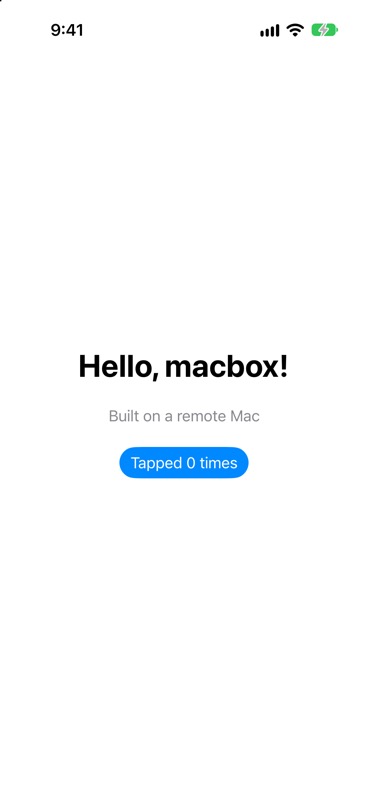 The account balance went from $9.90 to $9.80 across every session in the run, so $0.10. macbox charges $0.05 per Mac minute in whole minutes, only while a build, tests, a screenshot or a live session runs; the leftover part of a minute is free.
The rows come from three of the five MCP sessions I ran. The other two failed, and what tripped me up applies to MobileBuildMCP anywhere, not only through macbox:
- Session defaults last for one MCP session. When I started a new session and skipped
session_set_defaults, all four calls returned “Missing required session defaults: simulatorId is required”. Each new client process is a new session. - Element refs are per snapshot.
taptakes a ref likee9from the latestsnapshot_ui. Read the screen right before you tap, and again after. - Stop the Mac when you’re done. This one is macbox’s. After my client process exited, the macbox session kept running, and the next session waited behind it (“Waiting for a free Mac (1 ahead)”).
macbox stopends it, andmacbox statusshows what’s running.
If you’d rather not use MobileBuildMCP’s tool names, macbox also has its own smaller MCP server (macbox mcp, with build, test, screenshot, run, describe, tap, type, swipe and a few more). The Claude Code iOS guide runs the same app through it.
Hosted Macs: macbox vs NoMac
If you don’t have a Mac to SSH into, you need someone else’s. NoMac and macbox both rent Macs to coding agents, and both can get MobileBuildMCP running from Linux. They’re built for different jobs, though.
| macbox | NoMac | |
|---|---|---|
| MobileBuildMCP | Bundled: macbox mcp --xcode sends changed files before each tool call |
Not bundled; their docs show running it over SSH |
| MCP connection | Local stdio server (no hosted endpoint) | Hosted Streamable HTTP endpoint at mcp.nomac.app/mcp (OAuth 2.1 or bearer key), or npx @nomac/cli mcp |
| Own MCP tools | build, test, screenshot, run, describe, tap, type, swipe, press_button, look, stop, report_problem | start/exec/stop Mac, files, screenshot_mac, mac_input, signing, TestFlight and App Store publishing; simulator-use for simulator UI |
| Signing, TestFlight, App Store | Not yet | Yes |
| Physical devices | Not yet | – |
| Price, as each one states it | $0.05 per Mac minute, whole minutes, only while a build, tests, a screenshot or a live session runs | “$0.80 an hour, billed by the minute while the Mac is ready, one-minute minimum” |
| Credit | Prepaid; new accounts get $10 | $10 packs, bonus credit from $30, $5 per-session cap by default |
Pick NoMac if you need to sign and ship: certificates, TestFlight and App Store uploads are things macbox doesn’t do yet. Pick it too if your agent can only reach MCP over HTTP, since macbox only runs as a local server or CLI, or if you want a whole Mac you can run arbitrary commands on.
Pick macbox if the job is the build, test and tap loop. MobileBuildMCP comes set up, your changes reach the Mac before each tool call, and you aren’t charged while files upload, a job queues or the VM starts. Each account gets its own macOS VM on the same Mac mini every time, with the latest Xcode (Xcode 27).
On price I’m not going to convert NoMac’s hourly rate into a per-minute number. The two bill on different things (macbox on job time, NoMac on ready time), so compare them on what your agent does in a typical day.
FAQ
Does Apple support MCP?
Yes. Since Xcode 26.3, Xcode includes an MCP bridge, xcrun mcpbridge, that external agents like Claude Code and Codex can connect to. You turn it on in Xcode > Settings > Intelligence, under Model Context Protocol, and your project has to be open in Xcode.
How do I connect Claude to Xcode?
Two ways. For Apple’s bridge, turn on “Allow external agents to use Xcode tools” in Xcode’s settings, then run claude mcp add --transport stdio xcode -- xcrun mcpbridge. For MobileBuildMCP, run claude mcp add MobileBuildMCP -- npx -y mobilebuildmcp@latest mcp, which works without Xcode open. Many people use both.
Is XcodeBuildMCP the same as MobileBuildMCP?
Yes. Sentry renamed it in v2.7.1 on September 23, 2026. Same repo, new package name, binaries, Homebrew formula and environment variables. If your config still calls xcodebuildmcp, see my setup guide.
Which Xcode MCP server works on Linux or Windows?
None of them runs Xcode there; for iOS work they all need a Mac somewhere. MobileBuildMCP is the easiest to reach from Linux or Windows, because it doesn’t need the Xcode app open and can run over SSH on a Mac or on a hosted Mac. mobile-mcp and appium-mcp can also be reached over the network from a Mac. Apple doesn’t document a remote setup for its bridge; its documented setup needs Xcode open on the Mac.
Is there an MCP server for macOS apps?
MobileBuildMCP builds and tests macOS apps as well as iOS ones. If you want an agent to control a whole Mac (click, type, take screenshots of the desktop), NoMac’s MCP has mac_input and screenshot_mac tools for its hosted Macs.
Which one should I use with Claude Code?
MobileBuildMCP, plus Apple’s bridge if you have Xcode open on the same Mac. My Claude Code iOS guide walks through the whole loop.