Xcode on Linux: What Works for iOS Development in 2026
You can’t install Xcode on Linux or Ubuntu; there’s no Xcode on Linux at all. Apple’s Xcode system requirements list only macOS versions: the latest, Xcode 27.2 RC, needs “macOS Tahoe 26.6 or later”. There’s no Ubuntu package or any other Linux build. You can still do iOS development on Linux, though: write and edit the code on Linux, then get the parts that need Apple’s tools done somewhere that has them. There’s also one open-source tool, xtool, that builds some iOS apps on Linux itself.
Below is each option with its limits and price, checked on October 29, 2026. It ends with a timed run: a fresh Ubuntu 24.04 container, with no Xcode and no Swift, built an iOS app, passed its 4 unit tests and took a simulator screenshot in under 3 minutes, for $0.05.
Disclosure: I make macbox, the cloud Mac in that run. I’ll say where something else fits better.
The options at a glance
| Option | Builds a real iOS app? | iOS Simulator? | Runs on your Linux machine? | Cost |
|---|---|---|---|---|
| xtool | Yes, SwiftPM apps only | No | Yes | Free; needs Xcode.xip once and an Apple ID |
| Swift on Linux | No: no UIKit or SwiftUI | No | Yes | Free |
| Darling | No: “Xcode itself doesn’t run yet” | No | Yes | Free |
| macOS in a VM | Depends on the setup | Depends | Yes | Free; read Apple’s license yourself |
| Flutter or React Native | Only with a Mac or a cloud build | No | Code yes, iOS build no | Expo EAS: 15 free iOS builds a month |
| CI on a macOS runner | Yes | In CI only | No | GitHub: $0.062/min, free on public repos |
| Rent a Mac | Yes | Yes | No | By the day or month; see that guide |
| Cloud Mac from the command line | Yes | Yes | The commands do | macbox: $0.05 per Mac minute |
Why you can’t install Xcode on Linux or Ubuntu
Xcode isn’t just an editor. It ships the iOS SDK (the UIKit, SwiftUI and other frameworks your app links against), the compilers set up for Apple’s platforms, the asset catalog compiler, code signing, and the iOS Simulator, which is a macOS app that runs iOS on macOS. All of it is built for macOS and nothing else. Apple has never released a Linux version, so anything that calls itself “Xcode for Linux” is either a different tool or a way of reaching a Mac.
That leaves two kinds of answers: tools that rebuild part of Xcode’s job on Linux, and ways to borrow a Mac for the part that needs one.
xtool: build iOS apps on Linux with SwiftPM
xtool is the closest thing to Xcode on Linux. Its README calls it a “Cross-platform Xcode replacement. Build and deploy iOS apps with SwiftPM on Linux, Windows, and macOS.” It can:
- “Build a SwiftPM package into an iOS app”
- “Sign and install iOS apps”, onto an iPhone plugged in over USB
- “Interact with Apple Developer Services programmatically”
It’s active: version 1.24.0 came out on October 26, 2026.
Setting it up on Linux, per its install guide:
- “Install the Swift 6.4 toolchain.”
- Download Xcode 27.1 from Apple’s developer site. “You’ll be asked to log in with your Apple ID and accept the license agreement.”
- Point xtool at the download. “xtool will extract the Xcode XIP to generate and install an iOS Swift SDK for you.”
- Sign in to Apple: with an API key, which “requires paid Apple Developer Program membership”, or with a password, which “works with any Apple ID but uses private APIs”.
So you still download Xcode, but you never run it. xtool uses the SDK inside it. I haven’t run xtool for this guide; the limits below come from its docs and issue tracker.
What it doesn’t do yet, from its issue tracker:
- No iOS Simulator. Issue #311 is open. You test on a real iPhone.
- No Xcode projects. Your app has to be a Swift package. Building
.xcodeprojfiles is issue #144; in October the maintainer wrote “not yet but I have an MVP implementation”. - No asset catalogs. Issue #123 was closed with the note that Apple’s
actool“is proprietary and has little in the way of open source replacements”; two pull requests to add it are open. - No running iOS tests. xtool can build them, but running them takes a simulator, which means macOS (issue #177).
Pick xtool if you’re starting a new app as a Swift package, you have an iPhone and a cable, and you’d rather keep everything on your Linux machine. If you have an existing Xcode project, or you need the simulator, it isn’t there yet.
Swift iOS development on Linux: Swift yes, SwiftUI no
Swift itself runs on Linux; 6.4.1 is the current release on swift.org. You can write and test the parts of your app that don’t touch Apple’s frameworks: models, networking, parsing, business logic in a Swift package.
What you can’t do is import the UI frameworks. I tried it in the official swift:6.4.1 Docker image (Swift 6.4.1):
$ echo 'import SwiftUI' > main.swift && swiftc main.swift
main.swift:1:8: error: no such module 'SwiftUI'
$ echo 'import UIKit' > u.swift && swiftc u.swift
u.swift:1:8: error: no such module 'UIKit'
Swift.org offers cross-compilation SDKs for static Linux, WebAssembly and Android, but not iOS. Its platform page puts it plainly: “the tools on macOS can build Swift applications that run on iOS.” On Linux, the iOS SDK comes only from Xcode, which is why xtool needs the Xcode download.
A useful split if you’re on Linux: put your logic in a Swift package you test with swift test on Linux, and keep the UI layer thin.
Darling and macOS VMs
Darling is “a runtime environment that allows running macOS applications on Linux without a virtual machine”, a bit like Wine for macOS. Its own docs say “Xcode itself doesn’t run yet”, and there’s no simulator. It’s a fascinating project, not an iOS workflow.
Running macOS in a virtual machine on Linux (projects like OSX-KVM) runs real macOS, and so real Xcode. OSX-KVM’s own README says “It is your responsibility to understand, and accept (or not accept) the Apple EULA” and “This is not legal advice”, and I won’t give any either.
Flutter, React Native and Expo on Linux
Cross-platform frameworks let you write the app on Linux and run the Android version there. The iOS build still needs macOS:
- Flutter:
flutter build ioson Linux stops with “Building for iOS is only supported on macOS.” (from Flutter’s source code) - React Native: the setup guide says “A Mac is required to build projects with native code for iOS. You can use Expo Go from Expo to develop your app on your iOS device.”
- Expo: EAS Build builds the iOS app on Expo’s Macs. The free plan includes 15 iOS builds a month (low priority); after that, you move to Starter at $19 a month, which includes $45 of build credit, and then pay $2 or $4 per iOS build.
If your app is React Native or Expo, EAS Build is the simplest way to get an iOS build from Linux, and 15 builds a month are free. (macbox doesn’t support React Native, Flutter or Expo yet.)
CI: a Mac for each push
CI services with macOS runners, like GitHub Actions, let you push from Linux and get a build and test run back. On GitHub Actions a standard macOS runner costs $0.062 a minute, about ten times the $0.006 of a 2-core Linux runner, and standard runners are free in public repositories (GitHub’s pricing).
CI is good at “does it build and do the tests pass?” It’s slow for anything interactive: every change is a commit, a push and a wait, and you can’t look at or tap the app.
Renting a Mac
If you want Xcode with its full UI, rent a Mac by the day or month. I compared the providers and prices in Rent a Mac. You work in a remote desktop, so the Linux machine becomes a screen.
A real run from a fresh Ubuntu container
The last option keeps you on Linux and sends only the Mac parts away. macbox gives you your own macOS VM on a Mac mini, with Xcode 27, and a command-line tool: macbox build, macbox test and macbox screenshot send your project to it, run the job and print the result in your terminal. It’s built for coding agents like Claude Code, Codex and Cursor, but a person can type the same commands.
To show what that’s like with nothing installed, I started a clean Ubuntu 24.04 container and added only curl and ca-certificates:
$ which xcodebuild swift || echo "no xcodebuild, no swift"
no xcodebuild, no swift
$ curl -fsSL https://api.macbox.build/install.sh | sh
macbox: installed macbox 0.6.2-40acd6209b53 to /root/.local/bin/macbox
$ export PATH="$HOME/.local/bin:$PATH"
$ macbox status
Minutes left: 186 ($9.30)
Used today:   0 of 180 minutes
Your Mac:     mini-2 (online)
The installer ends with “Next: macbox login”. In this run I set MACBOX_API_KEY in the container instead.
The project is Tally, a small SwiftUI counter defined as an XcodeGen project.yml, with three app Swift files plus unit and UI test targets. The build:
$ macbox build
macbox: Sending 6 files (8 KB) from /work/tally
...
macbox: Generating the Xcode project with XcodeGen
macbox: Building Tally for the simulator
...
Build Succeeded
macbox: build succeeded in 32s (under a minute, not billed). Job dd7a37b0d61c868a.
Then the unit tests, one line per test:
$ macbox test --only-testing TallyTests
...
PASS TallyTests.CounterTests testIncrementAddsOne (0.00s)
PASS TallyTests.CounterTests testIncrementUsesStep (0.00s)
PASS TallyTests.CounterTests testResetReturnsToZero (0.00s)
PASS TallyTests.CounterTests testStartsAtZero (0.00s)
macbox: test succeeded in 1m7s (billed 1 minute, 4 tests passed). Job 46987318cd1a4307.
And a screenshot from the simulator, saved on the Linux side:
$ macbox screenshot /work/linux-shot.png
...
macbox: Booting the simulator
macbox: screenshot succeeded in 1m1s (under a minute, not billed, saved /work/linux-shot.png). Job b80fa1db27b0481f.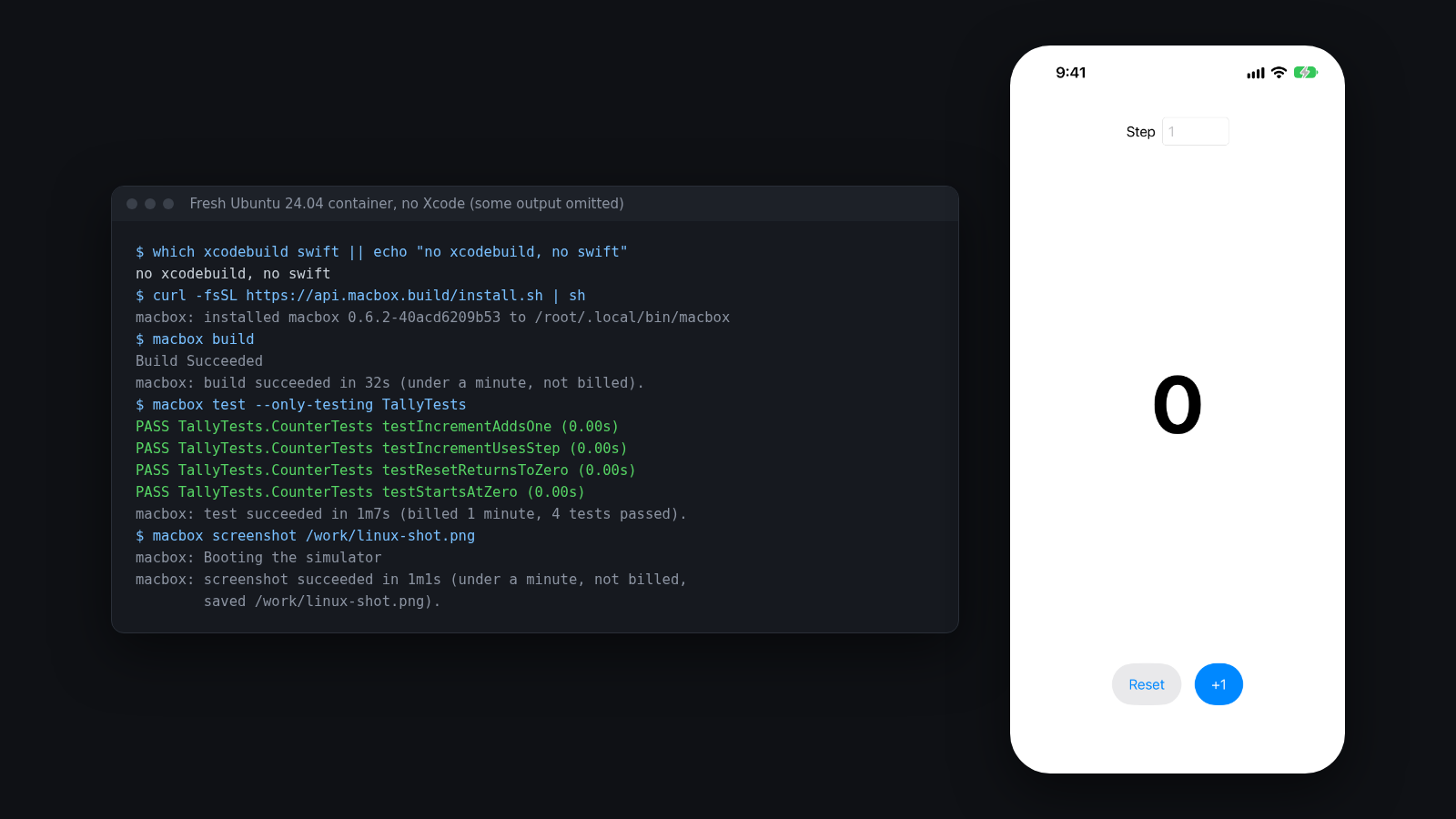
From starting the container to the PNG on disk took 2 minutes 49 seconds, apt included. It cost $0.05: macbox charges $0.05 per Mac minute in whole minutes, and the leftover part of a minute is free, so the 32-second build and the screenshot (58 seconds of Mac time, under a minute) cost nothing and the tests cost one minute. New accounts get $10 of credit, about 200 Mac minutes, and setup is one line.
For a live app rather than a picture, macbox run keeps the app running in the simulator and prints a link to watch and tap it in a browser; macbox ui describe and macbox ui tap do the same from the terminal.
With a coding agent on Linux
This is what macbox is mostly for. Claude Code, Codex or Cursor running on Linux can write the Swift, then run these commands themselves and fix whatever fails. To set it up, paste this into the agent in your iOS project:
Set up macbox by following https://api.macbox.build/guide/Or add it as an MCP server with npx -y macbox mcp. I’ve written up real runs for Claude Code and Codex.
What macbox doesn’t do
- No code signing, TestFlight, App Store upload or physical devices. For an iPhone in your hand, xtool is the Linux option; to ship, you need a Mac or a CI service with your certificates.
- Native iOS only: Xcode projects, workspaces, Swift packages, CocoaPods and XcodeGen. No React Native, Flutter or Expo.
- It sends files git tracks plus new files git doesn’t ignore;
.envstays home unless you pass--include .env, and--dry-runlists everything first.
Which one should you use?
- New SwiftUI app, real iPhone, want to stay fully on Linux: xtool, as long as a Swift package is fine and you can live without the simulator.
- React Native or Expo app: Expo EAS Build.
- Existing Xcode project, want builds, tests and the simulator from your Linux terminal or your coding agent: a cloud Mac you call from the command line, like macbox.
- Checks on every push: a macOS CI runner.
- You want to sit in Xcode’s UI: rent a Mac by the day or month.
- Shipping to the App Store: you’ll need a Mac somewhere with your signing certificate: rented, CI, or your own.
FAQ
Can you install Xcode on Linux or Ubuntu?
No. Apple builds Xcode only for macOS, and its system requirements list only macOS versions. No package for Ubuntu or any other distribution exists, and Darling’s docs say “Xcode itself doesn’t run yet”.
Can I build an iOS app on Linux?
Partly. xtool builds, signs and installs SwiftPM-based iOS apps from Linux onto a USB-connected iPhone, using the SDK from a one-time Xcode download, and plain Swift logic tests run on Linux with swift test. For Xcode projects, the simulator, or running tests that need iOS, you need a Mac: CI, a rented Mac, or a cloud Mac you call from the terminal.
Can I write SwiftUI on Linux?
You can write it in any editor, but you can’t compile it with Swift for Linux: import SwiftUI fails with “no such module ‘SwiftUI’”. Compile it with xtool (which takes the iOS SDK from Xcode.xip) or on a Mac.
Is there an iOS simulator for Linux?
Not from Apple, and xtool doesn’t have one yet. You can see and use a real one remotely: macbox streams the simulator to a browser, and rented Macs show it over remote desktop.
Can Flutter build iOS apps on Linux?
No. flutter build ios says “Building for iOS is only supported on macOS.” Use a macOS CI runner or a rented Mac.