Codex iOS: Build and Test iPhone Apps, Even Without a Mac
Yes, Codex can build iOS apps. It writes the Swift, runs xcodebuild, reads the errors, runs your tests and, with the right tools, taps through the app in the iOS Simulator. The catch is the same as for any agent: Xcode, the iOS SDK and the Simulator only run on macOS. If Codex runs on a Mac, OpenAI’s own guidance and its Build iOS Apps plugin cover the whole loop. If Codex runs on Linux or in Windows (WSL), it has to send the build to a Mac somewhere, and OpenAI doesn’t document Xcode in Codex cloud either.
This guide covers both. The Mac half follows OpenAI’s docs. The no-Mac half is two real runs I did on October 28, 2026, with the Codex CLI on an Ubuntu machine: Codex installed the tool it needed, built a small SwiftUI app and passed its 4 unit tests, then launched the app in a simulator, typed into a field, tapped a button three times and checked the result on screen. Both runs together cost $0.10.
Disclosure: I make macbox, the cloud Mac in the second half. If Codex runs on a Mac, you don’t need it.
Which setup fits where Codex runs
| Where Codex runs | Can it build and run iOS apps by itself? | What to use |
|---|---|---|
| Codex app or CLI on a Mac with Xcode | Yes | xcodebuild, then OpenAI’s Build iOS Apps plugin (XcodeBuildMCP) for the simulator |
| Codex CLI on Linux | No: no Xcode | A remote Mac Codex can call from the shell |
| Codex CLI on Windows (WSL) | No: no Xcode | Same as Linux, from inside WSL (Xcode on Windows) |
| Codex cloud | OpenAI doesn’t document Xcode in its cloud VMs | A remote Mac, with internet access turned on for the environment (not tested by me) |
Codex iOS development on a Mac: what OpenAI recommends
OpenAI’s native iOS apps use case is short and practical. Its main advice is to “Keep the loop CLI-first”: xcodebuild “can list schemes and handle build, test, archive”, and Tuist “can generate and build Xcode projects without needing the GUI”. It also says “For the first pass, you often don’t need a skill or MCP server.” Codex can run xcodebuild -list, xcodebuild build and xcodebuild test from its shell like any other command.
When you need more than build-and-test, OpenAI points to XcodeBuildMCP: “Use XcodeBuildMCP as soon as you are inside a full Xcode project and need deeper automation.” The easiest way to get it is OpenAI’s Build iOS Apps plugin. Its .mcp.json “wires in XcodeBuildMCP for simulator build/run/debug workflows”, and it bundles nine skills:
ios-debugger-agentandios-simulator-browserfor running and driving the app, including “mirroring Simulator in the browser and hot-reloading package-backed SwiftUI previews”ios-ettrace-performance,ios-memgraph-leaksandswiftui-performance-auditfor profiling and leaksswiftui-ui-patterns,swiftui-view-refactorandswiftui-liquid-glassfor UI workios-app-intentsfor App Intents and Shortcuts
OpenAI’s simulator debugging use case shows the loop it’s built for: build and launch the app, reproduce the bug by tapping and typing (“Prefer accessibility labels or IDs over raw coordinates”), collect screenshots, logs and LLDB output, make the smallest fix, then rerun the same flow.
One catch: XcodeBuildMCP was renamed MobileBuildMCP in September 2026. The plugin’s .mcp.json still runs npx -y xcodebuildmcp@latest mcp, and the old xcodebuildmcp package stopped at 2.7.0 (npm showed mobilebuildmcp at 2.7.1 on October 28). It still works; it just won’t get updates. XcodeBuildMCP without a Mac covers the rename.
All of that runs on the Mac in front of you. XcodeBuildMCP calls Xcode’s tools and the local Simulator, so on Linux the plugin has nothing to call. If you want those Xcode tools anyway, macbox mcp --xcode runs MobileBuildMCP on the macbox Mac (LLDB debugging, Swift package builds and tests, simulator location and appearance).
Building iOS apps with Codex without a Mac: the setup
Without Xcode on the machine, Codex needs a command it can run that does the Xcode part on a real Mac and prints the result. I used macbox: a CLI that sends the project to your own macOS VM on a Mac mini (Xcode 27), runs the build, test or app there, and streams the output back. Codex treats it like any other shell command, and the exit code tells it what happened: 0 worked, 1 the build or tests failed, 2 a usage or local problem, 3 a problem on macbox’s side or the account.
-
Install the skill, which tells Codex when and how to use the commands. In your project:
npx skills add opslane/macbox-agent --agent codex -yThis copies
SKILL.mdinto.agents/skills/macbox/, where Codex finds it. -
Log in. Run
macbox login(it prints a link to sign in with GitHub), or setMACBOX_API_KEYin the environment Codex runs in. If the CLI isn’t installed, telling Codex “Set up macbox by following https://api.macbox.build/guide/” walks it through install and login. -
Or use MCP instead of the CLI. If you’d rather give Codex tools than shell commands:
codex mcp add macbox -- npx -y macbox mcpThat adds
[mcp_servers.macbox]to Codex’sconfig.toml, with tools including build, test, screenshot, run, describe, tap, type, swipe and stop.
For the runs below I used the CLI and the skill. I loaded the skill through Codex’s plugin system rather than npx skills add, but it’s the same SKILL.md file (I checked both the same day).
To make Codex reach for it every time in a repo, add a line to AGENTS.md:
## iOS builds
This machine can't run Xcode. Use macbox for every iOS build, test and simulator check:
`macbox build`, `macbox test`, `macbox run` then `macbox ui describe` / `macbox ui tap`.
Run 1: build the app and run its unit tests
The app is Tally, a small SwiftUI counter defined as an XcodeGen project.yml, with a unit test target. The macbox CLI wasn’t installed; only MACBOX_API_KEY was set. I ran Codex CLI 0.163.0 in the project with this prompt, which doesn’t mention macbox:
This Linux machine can’t run Xcode. Build this iOS app and run its unit tests, then tell me the result.
Codex found the skill and read it. (Its first try used a wrong path to the skill file; a file search a few steps later found the right one.) It ran macbox status and got command not found, so it said “I’m following the Macbox setup guide”, fetched https://api.macbox.build/guide/, and installed the CLI with the guide’s install line:
$ curl -fsSL https://api.macbox.build/install.sh | sh
macbox: installed macbox 0.6.2-40acd6209b53 to /home/abhishek/.local/bin/macbox
Then macbox status worked (“Minutes left: 188 ($9.40)”), and it built:
macbox: Generating the Xcode project with XcodeGen
...
Build Succeeded
macbox: build succeeded in 32s (under a minute, not billed). Job aae453b3f7e1720c.
Then it ran only the unit test target (it called the CLI by its full path, since the new install wasn’t on its PATH yet):
$ /home/abhishek/.local/bin/macbox test --only-testing TallyTests
...
PASS TallyTests.CounterTests testIncrementAddsOne (0.00s)
PASS TallyTests.CounterTests testIncrementUsesStep (0.00s)
PASS TallyTests.CounterTests testResetReturnsToZero (0.00s)
PASS TallyTests.CounterTests testStartsAtZero (0.00s)
macbox: test succeeded in 1m3s (billed 1 minute, 4 tests passed). Job a3ee63ba0e0ae846.
Its answer: “The iOS simulator build succeeded on the remote Mac. All 4 unit tests in TallyTests passed.” One PASS or FAIL line per test is what makes this work well for an agent: when a test fails, the failing test’s log lines come back with it, and Codex can go straight to the fix.
Run 2: run the app in the simulator and tap through it
Unit tests don’t tell you whether the screen does the right thing. For that, Codex has to see the app. Same project, new prompt:
I’m on Linux with no Mac. Run this app on the iOS simulator, set the step to 5, tap the increment button three times, and check the count reads 15. Save a screenshot of the final screen to ../codex-final.png (outside this folder), stop the app, and tell me exactly what you ran and saw.
Codex ran macbox run, which builds the app, boots a simulator and keeps the app running:
...
macbox:   .env files are not sent unless you pass --include .env. See all with --dry-run.
...
macbox: Generating the Xcode project with XcodeGen
macbox: Building Tally for the simulator
...
macbox: Booting the simulator
...
Build Succeeded
macbox: the app is running (1m38s). Job ecbbd75a52fcb27c.
macbox: watch and drive it: https://…(live link removed)
The link opens the same simulator in a browser, so you can watch Codex work or take over with the mouse. Codex itself reads the screen as text. macbox ui describe lists every element with its label, accessibility identifier and frame:
Application "Tally" at 0,0 size 402x874
  StaticText "Step" at 139,93 size 35x20
  TextField value="1" id=stepField at 183,86 size 80x34
  StaticText "0" id=countLabel at 170,374 size 62x115
  Button "Reset" id=resetButton at 122,742 size 83x50
  Button "+1" id=incrementButton at 222,742 size 58x50
From there it did what you’d do by hand, using the identifiers rather than coordinates:
macbox ui tap --id stepField
macbox ui type 5
macbox ui describe                  # TextField value="5", Button "+5"
macbox ui tap --id incrementButton  # three times, about 0.9 s each
macbox ui describe
The last describe showed StaticText "15" id=countLabel. Codex saved the screen with macbox ui screen ../codex-final.png, stopped the app with macbox stop, and reported: “I ran macbox run, tapped the Step field, entered 5, and tapped incrementButton three times with macbox ui tap --id incrementButton. macbox ui describe then reported Step 5, button +5, and count 15.”
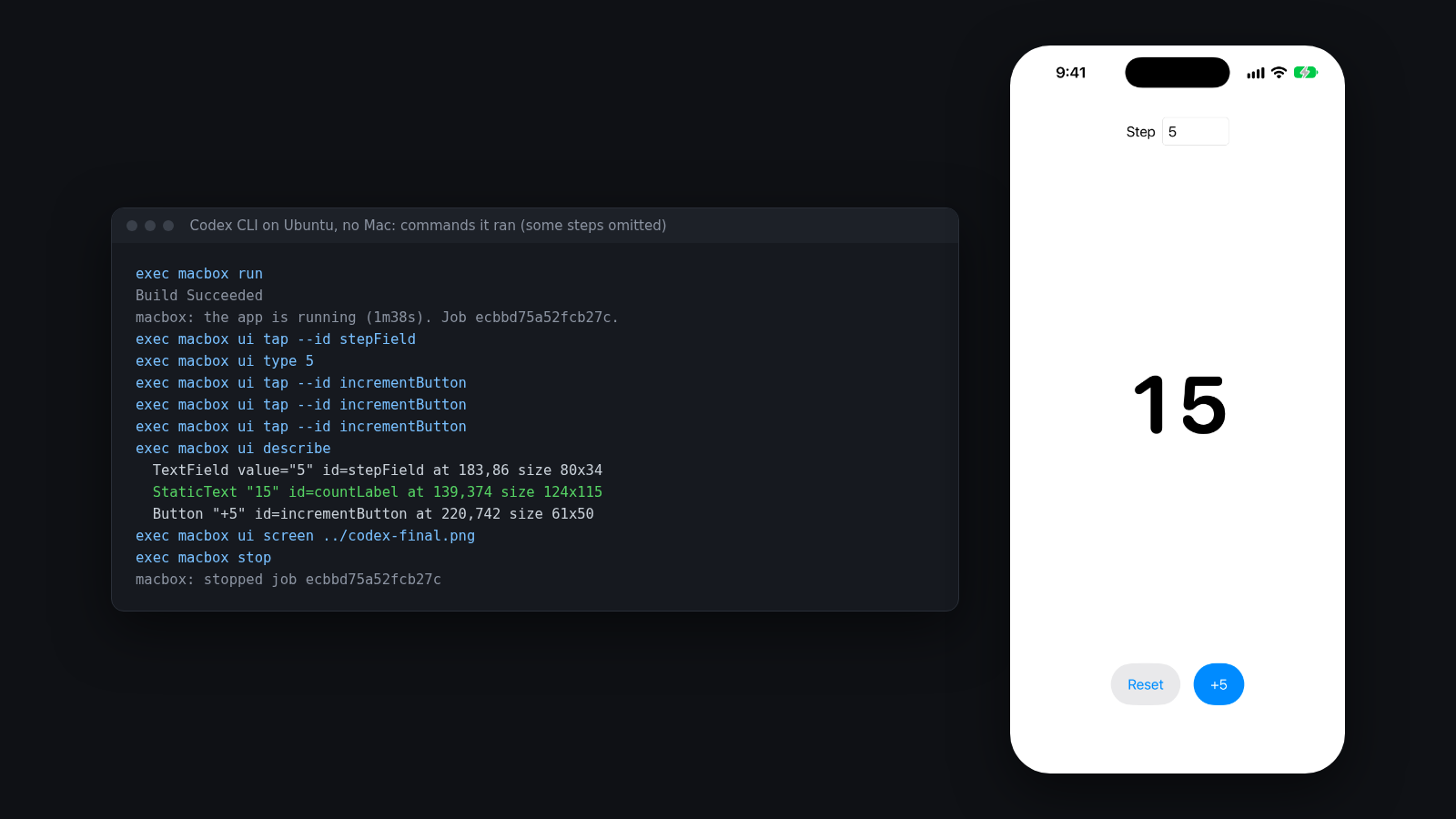
The whole Codex run took 2 minutes 34 seconds. The session, including the build, was billed 1 minute: $0.05. Billing is per Mac minute in whole minutes, and the leftover part of a minute is free, which is why the 32-second build in Run 1 cost nothing.
Codex cloud and iOS builds
Codex cloud runs each task in a VM that OpenAI hosts, set up from your repository. OpenAI’s environment docs don’t mention Xcode or macOS, and OpenAI’s reference image, codex-universal, is Ubuntu-based, so plan on calling a Mac. I haven’t tested this inside a Codex cloud task, only from Linux. The macbox setup would need two settings: put MACBOX_API_KEY in the environment’s environment variables, and turn on internet access for the environment, either all public internet or allowed domains that include api.macbox.build and your Mac’s host. The step-by-step, including the domains to allow, is in iOS builds from cloud agents.
What this doesn’t do yet
- Signing and shipping: no code signing, TestFlight, App Store upload or physical devices. Codex can build and test for the simulator; releasing still needs a Mac with your certificates, or a CI service that has them.
- Other frameworks: native iOS only (Xcode projects, workspaces, Swift packages, CocoaPods, XcodeGen). No React Native, Flutter or Expo yet.
- Long sessions: a live session ends when Codex runs
macbox stopor starts a new build, test or run in the same folder, after 10 minutes with nobody using or watching it, or at the 30-minute job limit. - What’s sent: files git tracks, plus new files git doesn’t ignore.
.envisn’t sent unless you ask, and--dry-runlists every file first.
FAQ
Can Codex build iOS apps?
Yes. On a Mac it runs xcodebuild itself, and OpenAI’s Build iOS Apps plugin adds simulator control through XcodeBuildMCP. On Linux or Windows, it needs a remote Mac it can call, because Xcode only runs on macOS.
Can Codex use the iOS Simulator?
On a Mac, yes, through XcodeBuildMCP (included in the Build iOS Apps plugin). Without a Mac, it can drive a simulator on a remote Mac: in Run 2 above, Codex read the screen with macbox ui describe and tapped with macbox ui tap --id.
Does Codex cloud support Xcode?
OpenAI doesn’t document it: its cloud environment docs don’t mention Xcode or macOS, and Xcode only runs on macOS. Plan on Codex calling a Mac, with internet access turned on for the environment.
How much does it cost to build iOS apps with Codex without a Mac?
With macbox, $0.05 per Mac minute, in whole minutes, and anything under a minute is free. The two runs in this guide cost $0.10 together. New accounts get $10 of credit, about 200 Mac minutes.
More guides
Claude Code for iOS, even without a Mac, iOS builds from cloud agents, XCUITest from the command line, and renting a Mac by the minute.